


What is EXAM?
The University of Eastern Finland uses the EXAM electronic exam system for electronic exams. You can take exams at your own convenience during the examination period set by the lecturer. Exam rooms are available on both the Joensuu and Kuopio campuses. You can book your exam time up to 30 days before the exam.
You can also take your exam at another university’s EXAM room as an exam visit. See where exam visits are available and read the exam visit instructions carefully before enrolling. If you have questions, contact your university’s support services (UEF: [email protected]).
How to take an EXAM
- Register for the course in Peppi. The exam will not appear in EXAM if your course registration in Peppi is not completed.
- Book an exam time and room through the EXAM service. See instructions for booking an exam room if needed.
- Go to the exam room at your reserved time. You can only take the exam on the computer whose number has been sent to you. You can go to the computer early if it is free – the exam will open at the scheduled start time. Pay attention to the room-specific instructions shown in EXAM when you made your reservation.
- Answer the exam questions according to these instructions and submit all attachments before finishing the exam. Attachments cannot be added afterwards.
- Wait for your results. Once the teacher has assessed your exam, you may receive feedback and a preliminary grade by email. The official grade will be recorded in the university’s study register.
If you cannot attend the exam, remember to cancel or reschedule your booking in the EXAM system. You can retake the exam once the examiner has graded your previous attempt.
Rules in the exam room
Bring your ID (student card, personal ID card, or driver’s licence). Identity checks may be carried out during the exam for all students in the room. If you do not have the ID, the person who carries out the check will instruct you on what to do.
You may not bring into the exam room:
- phones, watches, notes, or outerwear.
- water bottles with labels (a label-free bottle is allowed).
- smart devices (smartwatches, smart glasses, etc.)
In the exam room:
- absolute silence must be maintained.
- video surveillance is in operation.
- you must complete the exam before leaving – you are not allowed to leave and return during the exam.
If your exam is interrupted for a compelling reason (e.g. a technical issue), fill out the electronic exam interruption form as soon as possible so your attempt can be released and you can book a new exam time.
Failure to follow these rules may result in a failed grade.
You can store your belongings in the lockers outside the exam room. If you are unsure about the exam technology, take your exam during Oppari’s opening hours so you can get help if needed. You will take the exam on the specific computer assigned to you – the computer number is included in your booking confirmation.
Please come to the exam without perfumes or fragrances.
Exam rooms and opening hours
You can enter the exam rooms without an access token during the building’s opening hours. You can check the building’s opening hours here.
Exams in the evenings, at weekends, and on public holidays
You can take exams in the evenings, at weekends, and on public holidays at Natura (N112, Joensuu) or Mediteknia (MD 1029, Kuopio) between 6.00 and 5.00. You will need an access badge.
Two ways to get an access badge
- Personal access badge – apply using this form. With a personal badge, you can go directly to the exam room without visiting the Oppari service desk.
- One-time access badge – collect it from the Oppari service desk before your exam. Check Oppari’s service desk locations and opening hours.
Exam visitors are not granted access badges. Visitors can only take exams during Oppari’s opening hours.
Note for students taking exams at Mediteknia (Kuopio)
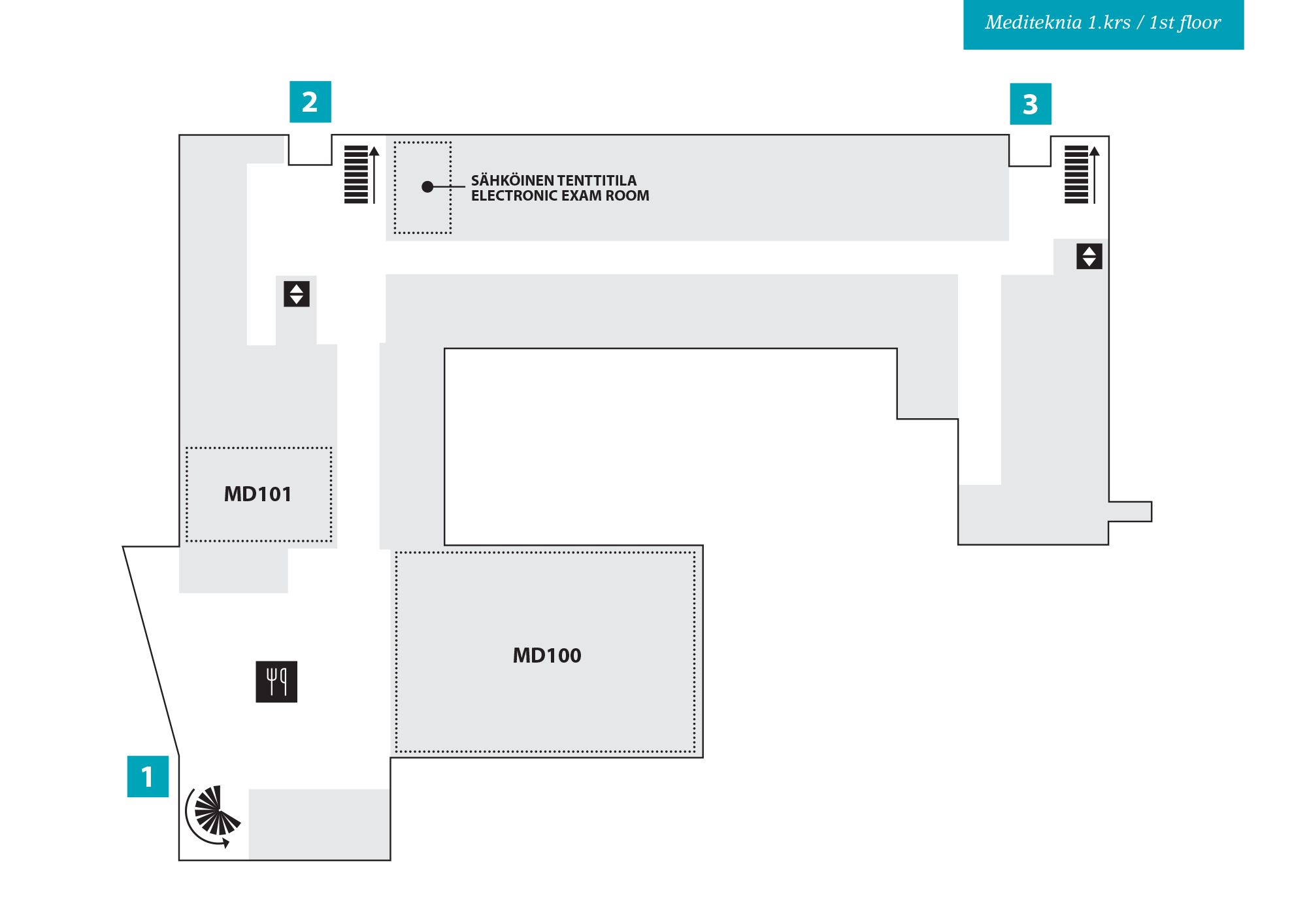
The door connecting Mediteknia’s main lobby (restaurant area) to the exam room corridor is open only on weekdays between 7.30 and 16.00. If your exam starts or ends outside these hours:
- Leave your outerwear on the coat rack in the hallway near the exam room, as the connecting door cannot be opened even with an access badge when it is locked.
- Use the side entrance (Entrance 2 on the map) – you will need your access badge.
- Storage lockers are available next to the exam room. They operate with a four-digit code that you set yourself.
Taking an exam at UEF as a visitor
- If you are taking your own university’s exam at a UEF EXAM room, you can do so only during Oppari’s opening hours.
- Before your exam, make sure that your own university’s login credentials work, as you will need them for HAKA identification in the exam browser. There is no need to log in to computers.
Software on exam computers
- The following software is available on exam computers:
- MS Word (without spell check), Excel, PowerPoint, Paint.
- Calculator, PDF reader.
- GeoGebra, TI-Nspire CX Premium Teacher Software.
- Matlab, MicroDicom DICOM Viewer.
You can, for example, draft essay answers in Word. Access to external websites (e.g. Finlex) is blocked during the exam.
Accessible exam rooms
Accessible exam rooms are available for students who have the right to individual study arrangements. Access is always through the Oppari service desk.
- Locations for the accessible facilities:
- Joensuu: Carelia 162, 1st floor
- Kuopio: Canthia CA2316, 2nd floor
When will you receive your exam results?
The teacher must publish your exam results within three weeks. For EXAM exams, the deadline is calculated as follows:
- Exams taken before the 15th of the month: three weeks from the 15th of the same month.
- Exams taken on the 15th or later: three weeks from the 1st of the following month.
- Example:
- If you take an exam on 10 March, the teacher has until 5 April (3 weeks from 15 March) to read and grade the exam.
- If you take an exam on 20 March, the result must be published by 22 April (3 weeks from 1 April).
Useful links
- EXAM service – exam registration and room booking.
- EXAM instructions for teachers (UEF login required).
- Further information: [email protected].