


Due to the mutated strains of COVID-19, the Finnish Institute for Health and Welfare (THL) now recommends avoiding all non-essential domestic travel as well. The University of Eastern Finland’s coronavirus guidelines have been updated to correspond to THL’s recommendation. The updated guidelines now advise against all non-essential travel, both domestic and foreign.
Category: Common
Survey for students in Kuopio campus
Dear student in Kuopio campus,
Hi! I’m third school year wellness business economics student (Savonia University of Applied Science) and I’m doing a thesis together with my mandator Business Center North Savo. Part of this work is study that gathers information about students interests and thoughts about entrepreneurship and innovation education. Results from this study are used to improve the teaching so by answering you have an impact in this development. From answers one can’t be identified, and the answers are handled anonymously.
The answering takes time about 4-6 minutes. Everyone who takes part and submits their e-mail addresses have a change of winning movie tickets in the lottery. The survey has an English option and it can be chosen immediately when you open the link.
Best Regards
Samuel Laaksonen
University of Eastern Finland is preparing to return to normal in next autumn’s teaching
At the University of Eastern Finland, teaching in the autumn semester 2021 is prepared to be organised without any restrictions on physical attendance, facility capacities or group sizes. The well-being of teachers and students plays an important role in the planning of next autumn’s teaching.
However, it is likely that the coronavirus pandemic hasn’t fully subsided by the autumn. This is why teachers are asked to prepare for the following possible changes when planning their next autumn’s courses:
- the curricula should include the possibility to switch to online teaching also on courses where in-person teaching is preferred,
- online, blended and hybrid modes of teaching should primarily be used on courses where this pedagogically justified,
- specific attention should be paid to first- and second-years students in order to foster their commitment to the academic community and to their studies, and
- online teaching should be preferred over in-person teaching on courses that would be difficult to re-design, should the circumstances change (e.g., facilities and groups of mass lectures).
The curricula for the academic year 2021–2022 are to be confirmed no later than 31 March 2021. The syllabuses for the autumn semester will be confirmed by 15 June 2021, and detailed teaching information will be published in WebOodi no later than 31 July 2021. The syllabuses for the spring semester will be confirmed, and detailed teaching information published in WebOodi, no later than 30 September 2021.
Teaching in the summer 2021 is organised in accordance with the decisions pertaining to the spring semester.
The situation is re-evaluated monthly on the basis of the recommendations and orders given by the Regional State Administrative Agency.
Reminder: please remain studying remotely from home if someone in your household is exposed to COVID-19
Due to the worsening coronavirus situation in Kuopio, the regional coronavirus coordination group now recommends remote work also to those who live in the same household with someone who has been exposed to the coronavirus. The objective of the recommendation is to prevent the region from entering the community transmission phase of the epidemic, which would also lead to tighter restrictions.
Staff members and students of the University of Eastern Finland are asked to follow this recommendation.
From Oodi to Peppi – important information for students
University of Eastern Finland will deploy a new student data system in late 2021. WebOodi will be replaced by a modern data ecosystem called Peppi.
The Peppi ecosystem includes a lot of diverse functions and plug-ins that will make every-day working and studying at the UEF easier. In addition to the student data system, Peppi will include functions for educational planning and facility reservation.
In Peppi, students can e.g.
- plan their studies (PSP)
- register for courses and exams
- view their timetable
- get study certificates and transcripts of academic records
- apply for courses completed at another institution to be registered to their UEF degree (recognition of prior learning)
The students’ functions are compiled cleverly to the student’s desktop in Peppi. The contents at the student’s desktop will be outlined by the autumn 2021, and the students’ UEF Peppi working group formed in December 2020 will participate in the planning.
The exact schedule of the Peppi deployment will be decided in the spring 2021. Prior to the deployment, there will be approx. a three-week downtime period during which no changes can be made to the student data system. However, WebOodi can be accessed in read-only mode. The downtime period is related to the student data system only, while teaching and studying continue normally.
Everyone should prepare for the downtime period where possible. Especially those students planning to graduate in late 2021 should take the downtime period and possible schedule changes caused by it into account. Everyone’s matters will be handled and saved to the data system as soon as possible, but the data system change may affect the services and the downtime period might slow down the process of graduation in late 2021.
It is worthwhile to follow the UEF Peppi communication and instructions. Information on the schedules of graduation and other important student matters will be given during the spring. There will be a to do list to help you prepare for the downtime period and the data system change, and further information will be available for students.
There will be help and support on how to use Peppi available. During this spring, there will be Peppi info sessions for students. The user instructions for Peppi will be compiled according to the user groups to the Peppi handbook, and the first version will be published with instructions for the deployment during this spring. After this, the handbook will be updated with user instructions and other relevant information.
Peppi-related news, discussions and events can be found in the Peppi Yammer group. Peppi-related questions and ideas can be sent to the email [email protected] . For further information about the students’ UEF Peppi working group, you may contact the working group leader Jenna Jokinen.
Gyms at the University of Eastern Finland will be closed due to the coronavirus situation
Due to the coronavirus situation, the University of Eastern Finland’s gyms in both Joensuu and Kuopio will be closed for the time being, effective from 28 January 2021. The closure also applies to the gyms in the facilities of the teacher training schools.
The re-opening of the gyms will be evaluated when the regional coronavirus situation improves.
Booking of appointments to UEF career counsellors via JobTeaser
Do you need support in decision-making while planning your studies or career, in evaluating different educational or employment opportunities, or in setting personal goals? Would you like feedback for your CV or cover letter? You can book an appointment from a UEF career counsellor for job seeking advice (30 min.) or career counselling (60 min.) from the Appointments section in the JobTeaser portal. Appointments in English are available for UEF master’s degree students and recent graduates.
Note!
When you create a profile to the service, choose the course Students and alumni, please.
This choice enables you to see advertisements from Finnish organizations
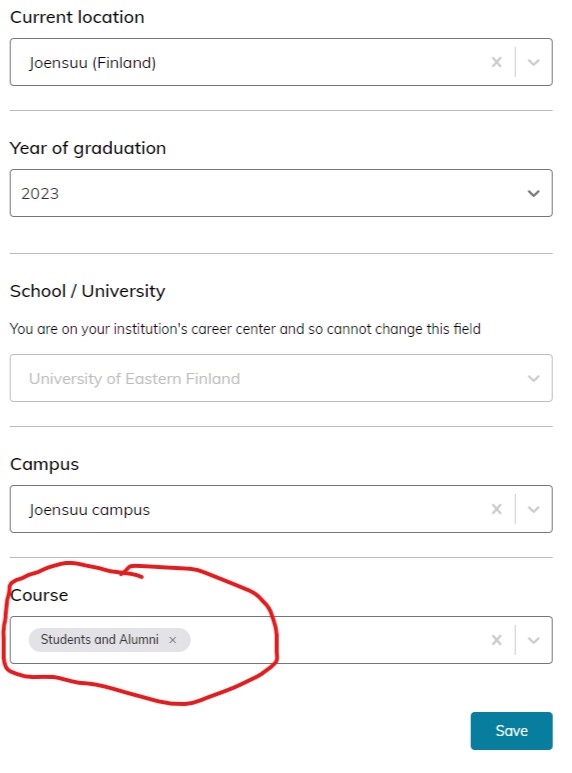
How to use JobTeaser and link to the service:

Share your views to contribute in an assessment of universities’ administrative autonomy – survey open until 7.2.2021
The Ministry of Education and Culture appointed on June 25th, 2020 a group to conduct an assessment of the status of administrative autonomy and its relationship with the provisions laid down in the Constitution. The assessment will take into account the tripartite university democracy. The group will additionally evaluate the need to specify the legislation regarding the election of the chairperson of the joint multi-member administrative body of a foundation university. A specific assignment is to assess the foundations of the automatic membership of the students in the Student Union in regard to the Constitution.
The assessment group is looking forward to hearing the views of the University community, so this survey is sent out to the students and the personnel of the universities. We hope that you share your views on a couple of questions regarding the administrative autonomy. The survey is open until 7 February 2021.
Thank you for your valuable contribution!
University of Eastern Finland suspends the arrival of international exchange students for the spring semester
Due to the coronavirus situation, the University of Eastern Finland has decided to suspend the arrival of international exchange students from abroad for the duration of the spring semester. The arrival of international exchange students is suspended until 31 July 2021.
The arrival of international exchange students to the University of Eastern Finland was suspended also for the duration of the past autumn semester, but the university was prepared to receive international exchange students for the spring semester. Earlier this year, approximately 160 exchange students from all over the world have arrived in the university’s campuses in Joensuu and Kuopio.
“There is now an increased risk of the coronavirus pandemic accelerating, so we’ve decided to restrict international mobility that is not crucial for the university’s activities. This is our response to mitigating the spread of the new variants and to protecting the health and safety of our staff,” Academic Rector Tapio Määttä says.
The decision to suspend the arrival of international exchange students concerns approximately 30 students who were scheduled to arrive in Joensuu or Kuopio this spring. The university will personally contact all students whom the decision concerns.
For further information, please contact:
Tapio Määttä, Academic Rector, [email protected], tel. +358 50 575 1589
Mutated coronavirus variants are more infectious – keep a safe distance of over 2 metres to others
The new, mutated coronavirus variants are more infectious and spread more easily than the earlier variant. This is why the Finnish Institute for Health and Welfare now recommends keeping a safe distance of over 2 metres to other people. In addition, close contacts should be reduced still. A face mask should be worn in all public spaces, even when it is possible to keep a safe distance of over 2 metres to others.
In addition to keeping a safe distance to others and getting tested at the first hint of symptoms, it is also important to keep in mind all the other ways of staying safe: maintaining good hand hygiene and proper coughing etiquette, downloading and using the Koronavilkku app, and wearing a mask.